

The model looks tidy: one corporate Wi-Fi, one password, pushed silently onto the managed laptops through device management. Users never type it and supposedly don’t even know it, so no one can pass it on. Plausible as that sounds, in typical enterprise environments the assumption doesn’t hold.
A Pre-Shared Key (WPA2- or WPA3-Personal) is a shared, symmetric secret. For the adapter to join the network, the key has to sit on the device. And what sits on the device can come back off it. We reproduced the chain in an isolated lab using nothing but built-in Windows tools — from reading the clear-text key to the certificate-based target design that fixes the root cause. Every screenshot here comes from that run; only synthetic data and a self-chosen test password were used.
One distinction up front, because it matters: WPA3-Personal is a genuine cryptographic improvement over WPA2. Its SAE handshake (Simultaneous Authentication of Equals) prevents the offline guessing of captured handshakes that made WPA2-PSK attackable for years. The point of this article is not the cipher. It is the model behind it — a key that everyone shares. For guest networks and isolated IoT segments, a PSK remains a legitimate choice.
Problem: the key lives on the endpoint — and so does the trust boundary
Where does the trust boundary of a shared Wi-Fi key actually sit? Neither in the air nor at the access point — on the client. That is where the key is stored so the device can connect. Windows keeps it in the WLAN service’s profile store, encrypted by default. But when an account with local administrator rights runs the built-in netsh command with the key=clear parameter, Windows returns the key in clear text — per Microsoft’s documentation, precisely when the caller is a local administrator.
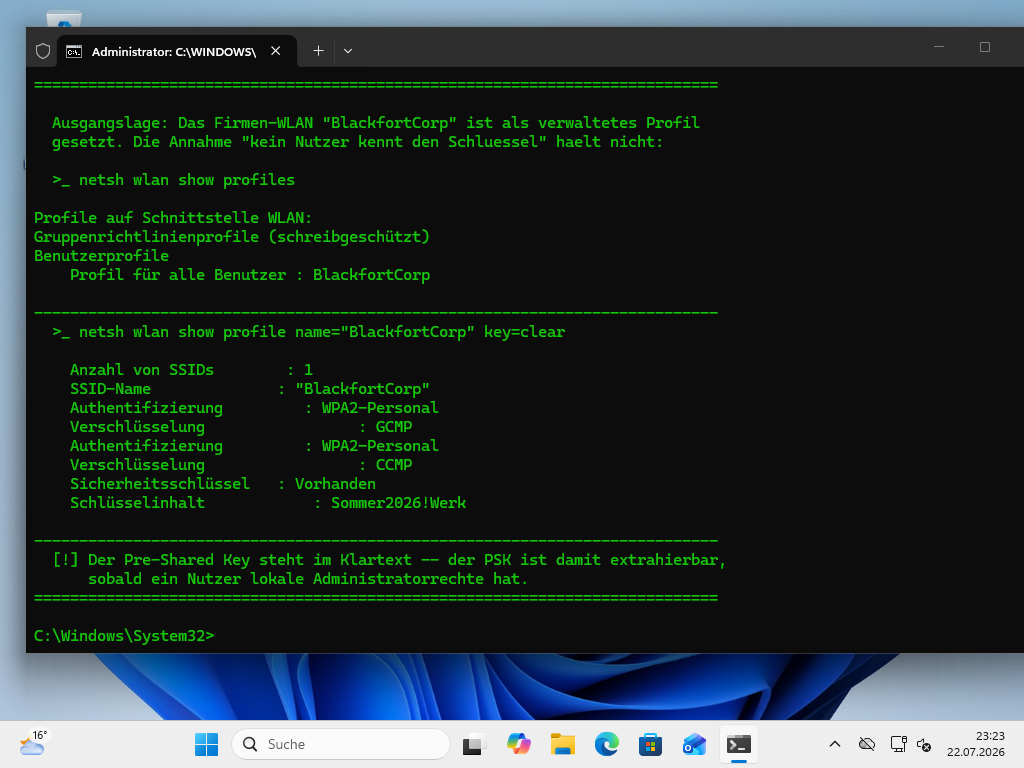
netsh wlan show profile key=clear prints the key in clear text.No exploit, no third-party code, no remote attack — a documented command doing exactly what it is meant to do. The only precondition is local administrator access on the device. That reframes the real question: trust in the Wi-Fi key ends at the most privileged account on the client. Where local admin rights are handed out widely, practically every user knows the key — they only have to ask for it once.
And the key doesn’t stay on the device. The same netsh call exports the profile as a file, with the key in clear text inside the XML:
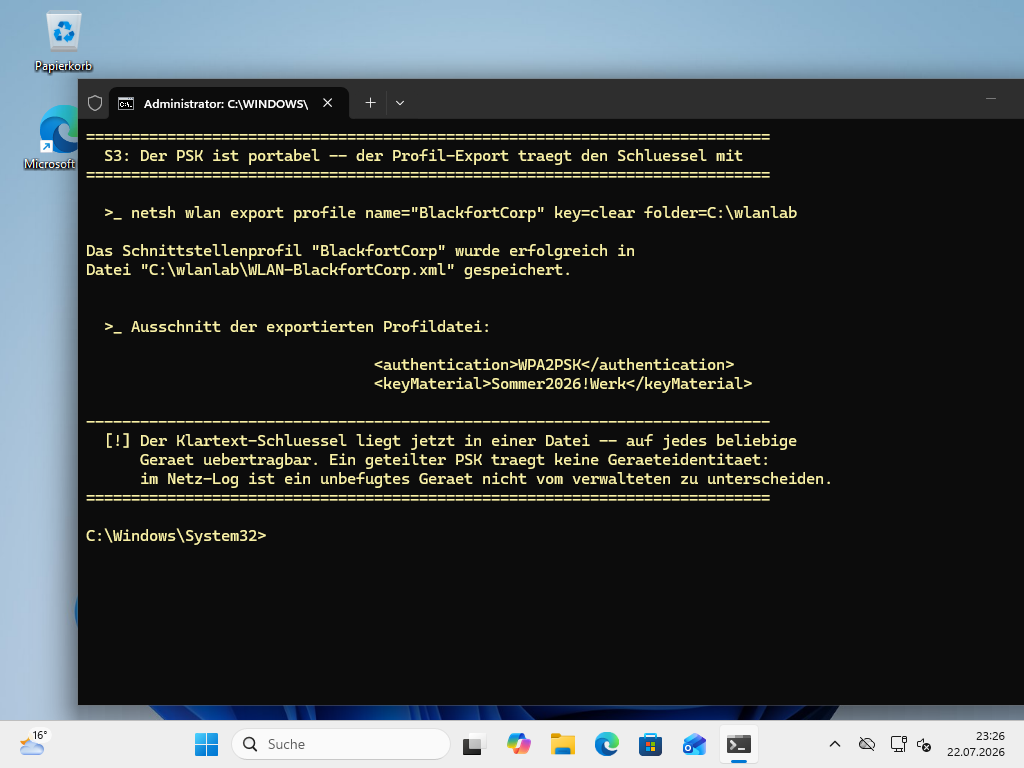
A text file that carries network access. It can be copied, emailed, moved onto any personal device. The “managed devices only” promise then rests on a secret that every managed device carries and every local administrator can hand out.
Scenarios: three failure points of the shared key
From that single property — one secret, shared by all, sitting on the endpoint — follow three practical weaknesses.
Extraction removes device trust. Once a user has the key, they can attach any device to the corporate network. The “managed hardware only” gate is bypassed without a single security tool raising an alert.
A shared key carries no identity. Because every device presents the same secret, the infrastructure cannot tell them apart. The access or connection log holds no meaningful device identity. An unauthorized device is indistinguishable from a managed one — there is no attribution.
Revocation only works group-wide. Once the key is compromised or a device is lost, there is no targeted way to pull access for that one device. The only option is to change the key for everyone and roll it out again across the whole fleet.
Intermediate options soften this without reaching the root. PEAP with MSCHAPv2 does move to an 802.1X login, but it stays a password credential — phishable and tied to a user, not a device. iPSK, or Private PSK, issues a separate key per device or group and thereby limits the blast radius of a compromise; the key still remains an exportable, copyable secret on the client. Cloud-PSK services relocate the management of the secret but change nothing about the fact that, in the end, a key sits on the endpoint.
Solution: the device proves it is itself
The workable design changes the trust model. Instead of a secret everyone knows, each device gets its own identity in the form of a certificate — and the matching private key never leaves the device. That is exactly what 802.1X with EAP-TLS provides: on connecting, each device proves its certificate to a RADIUS server, which makes and logs the access decision.
The decisive building block is where the private key is created and kept. Through the Microsoft Platform Crypto Provider it is generated directly inside the TPM and marked non-exportable. The proof is a non-event: the attempt to export the private key fails.
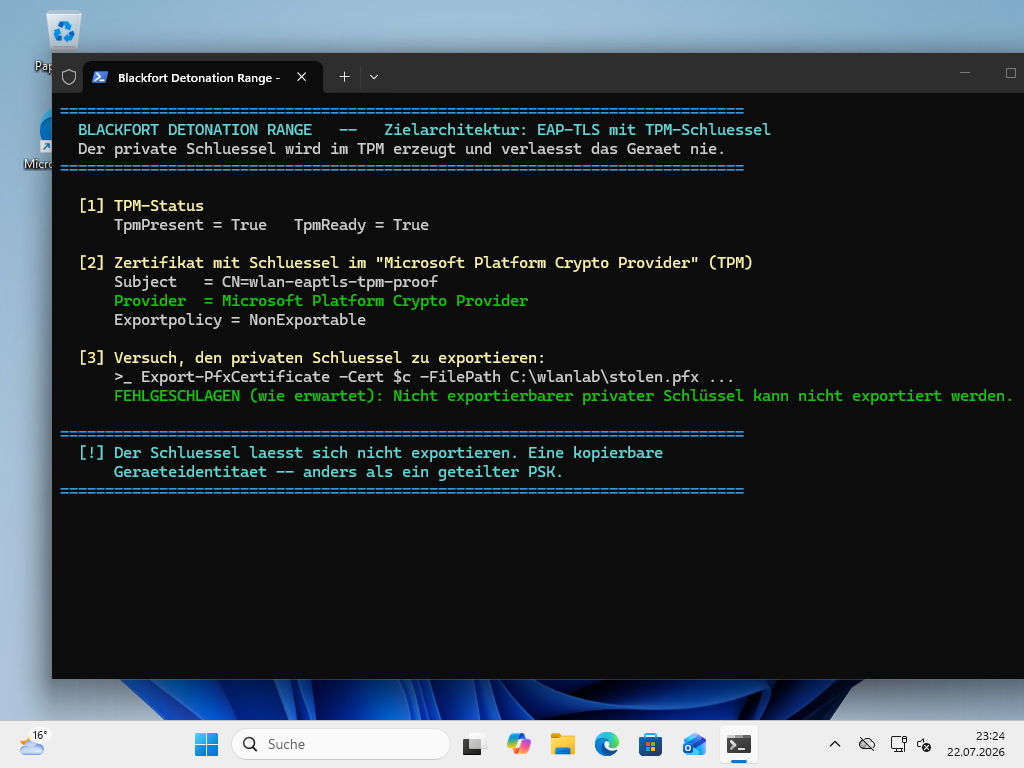
A key the device won’t release cannot be copied, cannot be read out via netsh, and cannot be exported to a file. The device identity is bound to this one piece of hardware.
On the network side, a RADIUS server — Microsoft’s Network Policy Server (NPS) in a Windows shop — decides on access based on the certificate. In the lab we reproduced that decision against a RADIUS server running EAP-TLS, with certificates chained to the same internal certificate authority. A managed device with a valid certificate is accepted; a device without a valid certificate is rejected — and both attempts appear individually in the log, tied to the device:
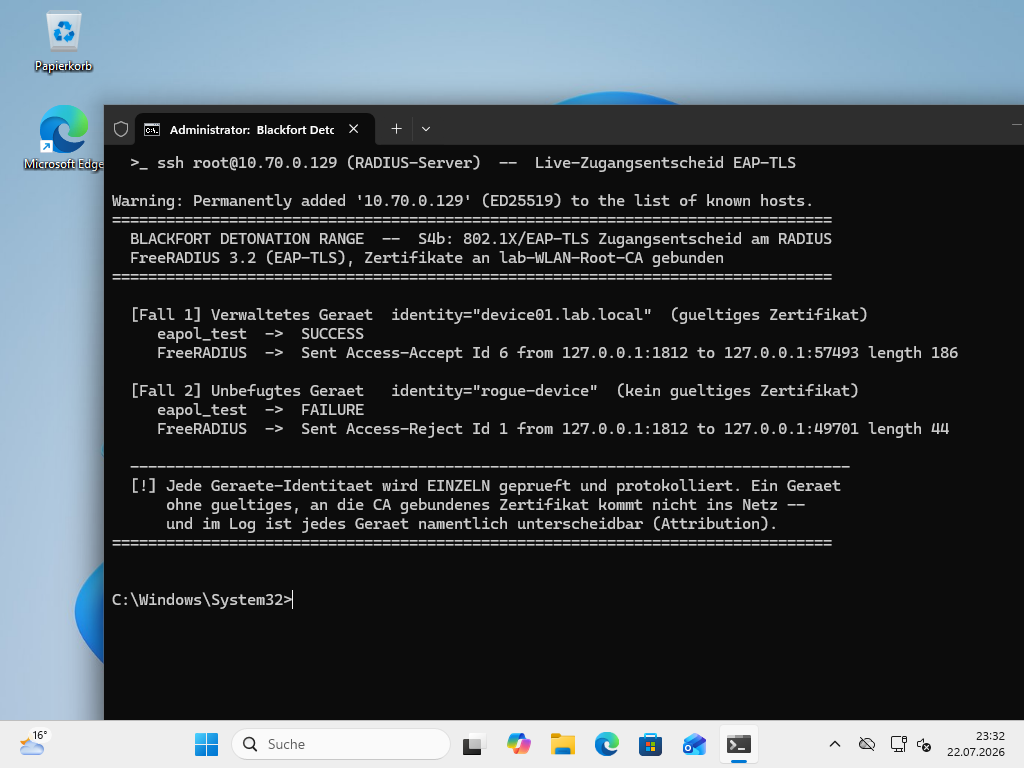
With that, the trust boundary moves from “who knows the key” to “which device can cryptographically prove it is itself”. The side benefit is visibility: every authentication is an event with a device identity, rather than an anonymous association. A lost device is revoked individually by withdrawing its certificate — without touching the rest of the fleet.
In practice this architecture rests on a manageable chain: a certificate authority (on Windows, the Active Directory Certificate Services, ADCS), certificate templates that enforce the TPM-bound key store, automated distribution to managed devices through device management (for example Microsoft Intune with SCEP or PKCS), and the RADIUS server as the policy and logging point. The real root fix sits alongside it: reining in widely handed-out local admin rights. The clear-text key in that first screenshot was only reachable because an account was allowed to administer the machine locally.
How this maps to regulation
This shift — away from the shared secret, toward device- and certificate-based authentication — aligns with common requirements, without any of them prescribing “EAP-TLS” word for word. NIST SP 800-153 recommends 802.1X/EAP-based Wi-Fi authentication for enterprise operation instead of a shared key. Germany’s BSI covers 802.1X/EAP in module NET.3.4 Network Access Control; requirement NET.3.4.A7 (“SHOULD”) calls for endpoints to be authenticated automatically and securely to the current state of the art — “on the basis of certificates or access accounts” — using weak methods only in justified, documented exceptions. The Wi-Fi module NET.2.1 lists weak EAP methods such as EAP-MD5 as a threat and requires revoking client certificates for stolen devices; it holds no explicit EAP-TLS mandate. In the financial sector, DORA (Regulation (EU) 2022/2554) addresses protection and prevention in Article 9; the granular requirements on network security, encryption and key management sit in the regulatory technical standard (Delegated Regulation (EU) 2024/1774), Articles 13, 6 and 7. This section is a technical assessment, not legal advice.
If you want to move from PSK to 802.1X/EAP-TLS — from the certificate architecture through RADIUS to distribution via device management — or first curb the broad assignment of local admin rights, Blackfort Technology supports Wi-Fi and NAC architecture and least-privilege hardening.
Takeaways
- →A Wi-Fi password is only as secret as the most privileged account on the client.
- →A PSK protects the radio link but carries no device identity — and therefore no attribution and no targeted revocation.
- →Access control on Wi-Fi means the device cryptographically proves it is itself — with a key it never hands over.
- →WPA3-Personal is an improvement; for guests and IoT, a PSK stays sensible. In typical enterprise networks, only certificate-based identity carries the model.